New WebKit article…
Here's another…
…and apparently KEEN might still be useful. I mentioned the app (and showed Hype in action) in this video…
It reminded me that I did learn something. Apparently, there's the option in a PWA to specify the orientation of the app. This is something I was struggling with, but I eventually found the problem — it's not supported. 
That, and all the nasty WebKit bugs shown today… About the security content of macOS Ventura 13.5 - Apple Support …I've been wondering about the future of Safari.
UPDATE
Just adding a note, so I can check on this tomorrow… WebKit Features in Safari 17.0 | WebKit
It says…
By providing a web app manifest, you can customize the presentation of your web app, including the display mode, name, theme color, and start URL. Learn about the details by watching What’s new in Web Apps at WWDC23.
I'm not sure what that means exactly, so I'm planning to test it.
ANOTHER UPDATE
Going back to the four main parts of a PWA, here's the progress…
The HTML Files — I was wondering why PWAs didn't take off or why this feature wasn't added to Hype earlier. Now, I suspect it's the level of frustration in getting the cross platform part just right. It's been a bit of a mess.
This might be helpful though…
…and it mentions…
<meta name="apple-mobile-web-app-title" content="AppTitle">
…which seems to be doing nothing on macOS / Safari, as the popup keeps defaulting to the manifest.json “short_name” of “Circles”. It's really frustrating to watch it popup with the correct name, but then shorten it for no apparent reason.
It's been a bit cumbersome to test this out with a Hype project. That's because of an issue mentioned before. The service worker should be on the root. Also, Hype blocks the editing of a the top part of the HTML file.
An App Icon — What a mess! Safari does a really bad job with app icons. It doesn't seem to be using the one specified in the manifest.json. Instead, I had to add this…
<link rel="icon" type="image/svg-xml" href="${resourcesFolderName}/app-icon.svg">
…but then Apple doesn't like you making your own icons, it adds a white box…

So, I added a background. It's funny how it can show a preview even when using the Hype preview…
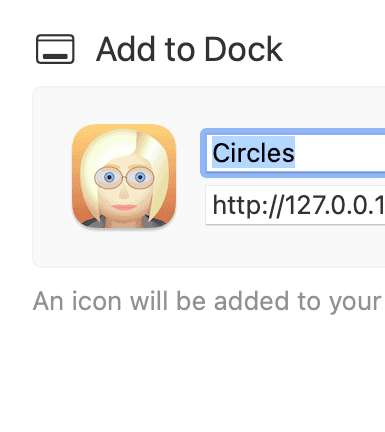
A Web App Manifest — I'm fairly happy with this part. I put most of the “Members” in alphabetical order. I'm still not sure if Safari respects orientation. That's because my PWAS is still not working.
A Service Worker — I still haven't gotten this working yet, as I don't want to use a library. I don't think that should be necessary if I just want to cache files for offline use. Although, versioning might be a concern. What if I update the project?
Anyway, a big requirement of a PWA is HTTPS. Except, my website is just throwing a 403 error when trying to install the PWA. The server is set to block the loading of files from outside of Photics.com. Hopefully this problem goes away when caching works.
I'm not sure if Hype is creating conflicts, as there's a “create offline application cache” setting. I decided to keep that unchecked. I tested to see if that would solve the caching problem. It did not.
Although, that's been a confusing part of testing. I'd clear the cache and nothing would change, clear it again, ah… there's the change.
UPDATE (December 18, 2024)
I'm just bumping this again to make it easier to find
…because I'm working on something that's related to “Whisk” & “Hype”.
Hee hee hee! 
Hopefully I can finish the project on-time. 