Hi Andrea!
So picking up where we left off…
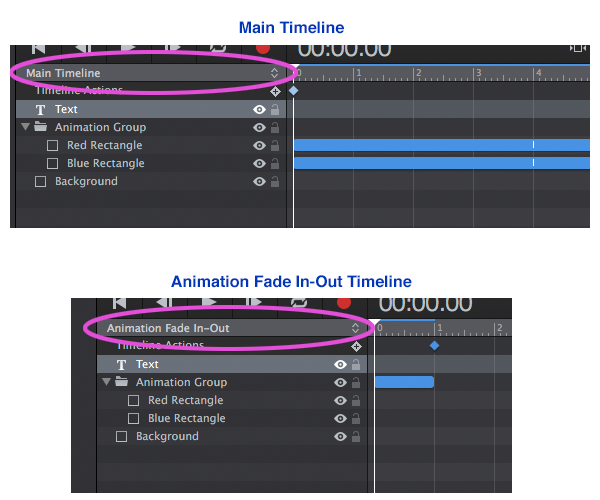
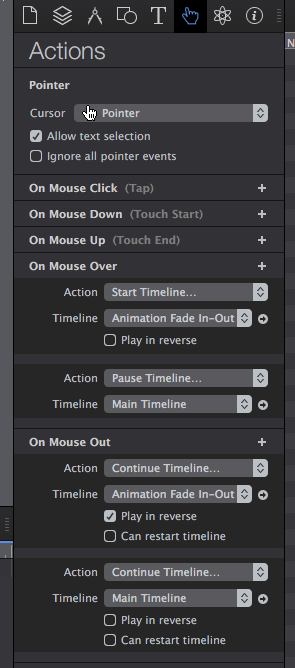
The above example used only JavaScript. The example here in this post uses only Timelines to achieve the same effect. It is very simple to create, but you need to pay attention to the various settings for the Timelines in the “Actions” Panel and in the “key frames” in the Timelines themselves (please see screen capture examples below).
In this example we have two Timelines: the default “Main Timeline” plus one called “Animation Fade In-Out”.
The “Main Timeline” controls the animation going up~down, and the “Animation Fade In-Out” controls the (surprise!) fading in & out of the animation when there is a “On Mouse Over” or a “On Mouse Out” event.
The overall effect is the same as for the JavaScript example: the animation goes up & down and fades~in out depending on the mouse event. The “Main Timeline” is paused “On Mouse Over” and resumes “On Mouse Out”.
I’ve created these two versions to show that You can create the same effect using different tools~approaches. Which one to use will depend on what your overall goals are in your presentation - and of course You can use JavaScript code You write in conjunction with Timelines.
Hype Project here: MouseOver_Text_Timeline-JHSv1.hype.zip (23.9 KB)