Ideas For Hype 5 Features…

I know I'm about a year late to the request for new 5.0 features. But I would like to encourage integrating the excellent HypeBlendModes by @MaxZieb into the Hype u.i. I'd love to have a pull-down menu of ink effects that I can apply to any object and have Hype add the needed code into the Head HTML and apply the additional HTML attributes for me.

Me (and the folks I work with) aren't much in the way of coders. We're simple folks, haha. User experience add-ons like this would get used more by us than things like physics and bones.

2 Likes

In the meantime, take a look at display: contents. As for blend modes … they’re browser native. My implementations are simply workarounds to mitigate the downsides of Hype’s container structure, which I believe are unnecessary. As demonstrated in my 3D example, these containers tend to cause more problems than they solve. I genuinely hope they’re removed in version 5.0.

3 Likes

I'm adding “Pointer Events” to the “Housekeeping” section

After uploading an early version of my Jigsaw puzzle to my website, I tested the game on mobile. It didn't work. I couldn't move the pieces. It's a matter of “Mouse” events versus “Touch” events.

How is that problem managed? Previously, you might try device detection, multiple event listeners, using JavaScript to determine the features supported by the browser. You can even see in Hype that actions have parentheses… On Mouse Down (Touch Start).

I was getting ready to write a function to monitor the devices. If it's a mouse event, do this… if it's a touch event, do that… except it's not so simple and my app crashed immediately. Do I use… Try / Catch? Do I use a toggle? A button on first click?

It was getting complicated!

Fortunately, PointerEvent is baseline. I simply changed my event listeners to use pointerdown, pointermove, and pointerup. Now the puzzle is starting to work on mobile.

Apparently the support even goes back as far as IE11… https://caniuse.com/?search=pointerevent

I suppose Tumult could decide it's not worth the hassle to rewrite code that already works. However, this supports “pen” inputs, which could create interesting possibilities… pressure, width, tilt …but I suppose that is rare. Controller support would be better. That's why this is a housekeeping idea.

Yes, this would be a good idea to migrate to more "modern" event tracking. Definitely more of a refactoring though, it is definitely an "if it ain't broke" situation... though that's not to say there are some edge case issues I wonder if this would help with. Filed, thanks!

1 Like

I just saw the news that there are new baseline CSS units…

While working on the Jigsaw game, I switched to using newer css units. They're very convenient. I was using vmin and vmax a lot.

Although, I'm not sure if I had gotten the centering perfect. It seemed like something was off. I was busy solving other issues, so I forgot about it. Also, I had forgotten about Apple's annoying “Cover Notches” problem.

It was nice to see a possible solution… small viewport and large viewport …and even better… dynamic viewport. I haven't experimented with it yet, but I think there's a general idea here… this is a nice feature!

So, I added it to the list of ideas for Hype 5 features. Perhaps it's a good idea for Hype to better support CSS units, to do something besides pixels. Part of the problem of designing websites lately are all of the screen sizes. I often end up throwing elements in a group and just scaling the group, but that can be a problematic. Recently, I've been trying to avoid using scale() and these new CSS units have been useful in getting that done.

1 Like

Yes, we have items on our feature list for adding other units. It is mostly a UI/preview challenge in not wanting to add complexity and since the units actually have meaning be able to properly show that in the situations where they matter. Sadly keeping everything in 'px' is the most simple way to present and modify elements.

Here's another idea to improve Hype — more elements!

HTML has a lot to do with semantical meaning. A div tag should only be used if there isn't a more appropriate tag. As an example, if I'm creating a toolbar menu group, it should go in a <menu> tag. If I'm creating a navigation menu, there should be a <nav> tag.

There are lots of HTML elements. It would be cumbersome to add all standard HTML tags to the Hype interface. So instead, perhaps that “div” could have a field to change the div to a user specified element. That could be fairly useful with groups, which are basically div tags.

That's a minimal improvement. What if Hype went further?

Well, this line of thinking started today because I wanted to make a table. What if Hype had a “table” element and a graphical interface for managing that?

I suppose this goes back to the earlier conversation of data management in Hype. Do people still make HTML tables anymore? I was using emmet abbreviation in Visual Studio Code and I was thinking, this is way too complicated for 2025. :grinning_face_with_smiling_eyes:

So, probably more common, what about a <nav> element? What if Hype made it easier to make a navigation menu? It could be a persistent symbol and use scene named for menu items.

What would be the point? I suppose if use of HTML tags improved, wouldn't it help Hype with Accessibility and Search Engine Optimization? :man_shrugging:t2:

2 Likes

Thanks for the feedback! I think it makes sense for Hype to at least allow changing the tag name of the top level Hype element insomuch as it won't interfere with standard editing abilities. Being able to have distinct options and editors for all the HTML elements is a lot, but clearly if there are some used frequently in Hype documents (primary purpose being animations) this would be a win. (I'd also actually like to have a better plugin system where these could be created as plugins).

1 Like

I suppose I should add “Marketplace” to the list too. :grinning_face_with_smiling_eyes:


UPDATE: I added the “Marketplace” and “Automation” sections to the list.

It's going to be fun when Hype 5 launches, to see which features actually made it into the update. :grinning_face_with_smiling_eyes:

1 Like

Here's just some more information about Physics. I was trying to figure out how to manage the momentum loss issue… https://github.com/liabru/matter-js/issues/256 …but I wasn't able to get that to work with my sample Hype project.

NOTE: The issue on GitHub is still listed as open.

So, I trying some experiments to solve this problem. That's when I noticed something…

It seems that Hype forces the “Bounce” value to round to the nearest tenth. Perhaps that field should allow for greater precision. The idea was if I could add a little bit of energy to the bounce, maybe it would negate the phantom energy loss.

Hopefully Hype 5 has a way to solve (or at least mitigate) the two biggest issues with Matter.js Physics — CCD and Frictionless Momentum Loss.

I tried troubleshooting the bounce problem by looking at the suggestions on the GitHub page. This… Matter.Resolver._restingThresh = 0.001; …didn't seem to do anything.

I changed the "slop" to "0" and the inertia to “Infinity”.
That didn't seem to solve the problem. :man_shrugging:t2:

However, you can see how the left ball starts to rotate after a few bounces. The “Infinity” setting doesn't fix the bouncing problem, but it does prevent spinning. (That seems like a good setting for Hype 5 to manage, perhaps as a checkbox.)

I tried to change the Hype Physics settings, but I was unsuccessful… friction, frictionAir, and restitution didn't change. I'm not sure if this is a Hype thing, as I have been able to change other values. That's what the Photics-Physics-Bridge tries to simplify — which is also a good idea for Hype 5. The Hype JavaScript API is a bit cumbersome when working with Physics settings.

Here's a test template, where the ball on the right has its Physics settings modified… bouncing.zip (11.9 KB)

Also, the version of Matter.js in Hype is quite old. It's version 0.14.2. That's from June 11, 2018.

Note that you should be able to set it via the API hypeDocument.setElementProperty('physics-bounce', 1.15); also.

Interesting. I understand that an infinite inertia would mean no rotational movement, but I feel this is pretty hacky since one would also assume linear inertia as well...

From what I gather this problem is pretty deep in the engine as a precision issue, so all the attempted workarounds in the issue will only be a bandaid.

I think if you want infinite bouncing I'd take an approach of always resetting the object to the same position at the time period of its apex. Sadly.

1 Like

I thought the Infinity value was just rotational. That's what's being done with the Jump template…

https://photics.com/free-template-tuesday-34-tumult-hype-jump/

Also, in the template example here, “Ball B” has Inertia set to infinity. You can grab it and throw it along the floor. It doesn't spin, but it can still slide.

What?! :grinning_face_with_smiling_eyes:

How long has that been a thing, or is it only for the Physics values set in the Hype app? I normally don't change those. I tried it out though…

hypeDocument.setElementProperty(b, 'physics-bounce', 1.0157095);

I wasn't able to even out the acceleration. :man_shrugging:t2:

…got some unexpected results playing around with the other settings. Even though the density was way higher on the red ball, the blue one wouldn't move…

 hypeDocument.setElementProperty(b, 'physics-density', 0.1);
 hypeDocument.setElementProperty(b, 'physics-friction', 0);
 hypeDocument.setElementProperty(b, 'physics-air-drag', 0);

I think one of the ways to handle this problem is to calculate the new direction at the moment of collision. (It's not infinite bouncing I'm trying to achieve, it's more like Pong bouncing.) And so, if I'm going to do that manually, probably don't even need a Physics engine.

Did you look into Phaser Box 2D? :thinking:

While both don't seem so active on GitHub lately, Phaser Box 2D was updated more recently.

Just now, I briefly looked at the code. I couldn't find the toPrecision() method used, but I did see the word “precision” used A LOT! The script has a lot of comments. I'm seeing some interesting parts for experimentation. Not today though, I got tired. :grinning_face_with_smiling_eyes:
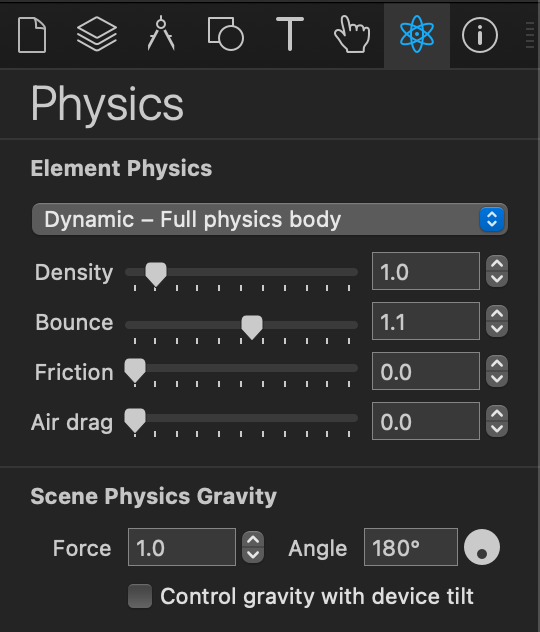
Introduced at the same time as the 'physics-body' that you use. The physics setElementProperty values just go through Hype's runtime and some like the physics-body-type have other house keeping code that Hype runs.

Not yet.

While there might be some precision values to play with, I was more referring to floating point precision. Probably at the rate/amount of calculations this is going to add up and introduce noticeable inaccuracies. From my glance I don't think this is an issue that can be solved in the current version of the engine by turning knobs. Instead it would require a rethink for accuracy.

I haven't gotten to it yet, but I was thinking of trying to add the toPrecision() method to the part of the code that controls the bouncing, in order to see if that fixes the phantom energy loss. It seemed like a good idea for a livestream, just looking at the code and maybe making it better.


Meanwhile, what about Images being added as <img> elements instead of background images in a div element? The reason I think this might be useful is because of the LCP related attributes… decode, fetchpriority, lazyloading …I don't think you can do that when an image is added as styling.

1 Like

There were some very specific reasons why we chose to do images via background tag, though without digging deeply I think it might have been mostly about supporting older browsers. At the very least it should be an option and generally the default.

1 Like

I think the phantom energy loss problem is fixed. :smiley:

I did a livestream on YouTube until the problem was fixed. The Physics engine did not need modification. Basically, the solution involved testing the suggestions here… https://github.com/liabru/matter-js/issues/256#issuecomment-847300752

There were three changes that did it…

  • Set the body inertia to “Infinity”
  • Set the slop to zero (0)
  • engine.positionIterations = 20;

Here's an example of indefinite bouncing working…

index.html.zip (1.1 KB)
(Matter.js not included. It's over here… https://raw.githubusercontent.com/liabru/matter-js/refs/heads/master/build/matter.js

The problem is that I couldn't get… engine.positionIterations = 20 …to work with Tumult Hype. I don't know where to set that value. :man_shrugging:t2:

All three of the changes were needed to add indefinite bouncing… slop = 0, inertia = Infinity, and engine.positionIterations = 20.

So, I think this is a great upgrade idea for Hype 5. An issue that is nearly 10 years old on GitHub seems solvable and the Physics features in Hype can be improved dramatically with the following…

Physics Improvements For Hype 5

  • Add finer control of Physics bodies
    • Inertia… especially the “Infinity” value
    • Slop
    • frictionStatic
    • isSensor
    • sleepThreshold
    • timeScale
    • (Basically review the docs and add what could be useful. Don't oversimplify it!)
  • Don't round values in Hype's Physics fields (Let us be precise without JavaScript)
  • Add greater Physics engine controls
    • engine.positionIterations <-- Important!
    • engine.velocityIterations :zzz:
    • engine.enableSleeping :sleeping_face:
    • Matter.Resolver._restingThresh
  • Update Matter.js to the latest version <-- Very Important!
  • Improving the Hype JavaScript API in order to make it easier to modify Physics settings — Essentially, it's like adding the Photics-Physics-Bridge, but native to Hype.
  • Debug Mode
    • render.options.showStat
    • render.options.showPerformance
    • render.options.showIds
    • render.options.showSleeping
    • render.options.showVelocity
    • render.textures
    • render.options.wireframes
    • render.options.wireframeStrokeStyle

The reason for Debug mode is so that people can easily see this data. I knew the problem was fixed when the console log constantly returned… {x: 0, y: 10.277777777777551} …as the velocity during collision start.

Essentially it's a tradeoff of performance vs accuracy… https://brm.io/matter-js/docs/classes/Engine.html#property_positionIterations …The default value is "6", but it's been almost 10 years. Computers are way more powerful now. That's another reason for adding the “Debug” mode. Let people do performance testing in their game, so they can adjust the Physics settings as necessary.

This is huge!

By making these fairly minor changes / additions, it addresses two major issues with game development and Hype. The CCD issue is improved with the newer version of Matter.js and these additional Physics settings resolve the energy loss issue.

While the API should be expanded to allow for easier management of Physics settings, the Hype app itself should also be updated to allow for more control over the Physics engine. I know Tumult is hesitant to do things like that, as it makes the interface cluttered, but this could be a winner!

This still needs testing and work, but I suddenly feel it might not be necessary to switch the Physics engine.

1 Like

Awesome, thanks for the writeup and discovery!

1 Like

Do you know how to add this… engine.positionIterations = 20 …to Hype? :thinking:

Also, perhaps there should be a “Set Velocity” action option in the “Actions” pane. That way, people can easily move Physics bodies without using JavaScript. Combine that with Controls… WASD / Arrows / Keys / Gamepad API …and that's a big start to making a lot of different games.


Added… engine.enableSleeping …to the Physics list in post #78

While it isn't a precise method, the general workaround to do this now without code would be to animate the object moving to give it some velocity.

var physicsElement = hypeDocument.getElementById("b");
var engine = hypeDocument.getElementProperty(physicsElement, 'physics-engine');

engine.positionIterations = 20;

?

! — bouncing-v2.zip (12.6 KB)

NOTE: The ball stops moving if the window is resized.

That's how the Bounce template works…

…and I think that's the point of the thread here. You might be sitting on a goldmine. With some improvements, practical web game development becomes possible. Look…

bouncing

I couldn't do that before. The ball would either fly out of the containment area or slow down to a stop. That means basic ball bouncing games, where perpetual bouncing is required, couldn't be built — not easily. But if common Matter.js settings become part of the Hype interface, such as setting velocity, wow!

That's significant potential for Hype 5. Embrace the Physics engine. Make the advanced settings part of Hype.

Ah, that's interesting… how you have to get a Hype element first, before changing the engine settings. That seems like an improvement, a central “physics-engine” Hype JavaScript API — without the “getElementProperty” part.

I wasn't sure if engine.positionIterations = 20; would work on all Physics bodies when making such a change — but it worked! — bouncing-v3.zip (12.9 KB)