I can't open more than a few hype files made in 2020, please advise as to what's going on. I see it maybe an issue with being made on a prior computer. How to fix?
There shouldn't be any specific incompatibilities - the file format is the same. Is it giving a specific error message?
The biggest culprit is sometimes if it is in a synced directory, the sync mechanism sometimes corrupting the file.
Would it be possible for you to file this as an issue within the app so we can get logs, and then also zip your .hype document and add it to the files section? (via the 'Help > Report an Issue…' menu when Hype is launched)?
Can you also let me know:
- Was your file saved in a network, synced, or otherwise non-standard directory? (even if it is on the desktop, are you using the icloud desktop feature?) Maybe you can report where it is located.
- How are you trying to open? Double-clicking in the finder? choosing the file > open menu, etc?
Hopefully we can figure out what is happening. Thanks!
Hi Jonathan, when I go to open the file its "grayed out " so it won't launch or it cannot be double clicked to launch. Have a bunch of files made in 2023 that are no problem but more than a few made earlier that same thing is happening. Trying to launch from my desktop hard drive not the cloud.
Can you attach a screenshot of what you mean by greyed out?
(Also to verify, you are not using iCloud drive with "Desktop & Document Folders" set to sync? I believe this is now the default).
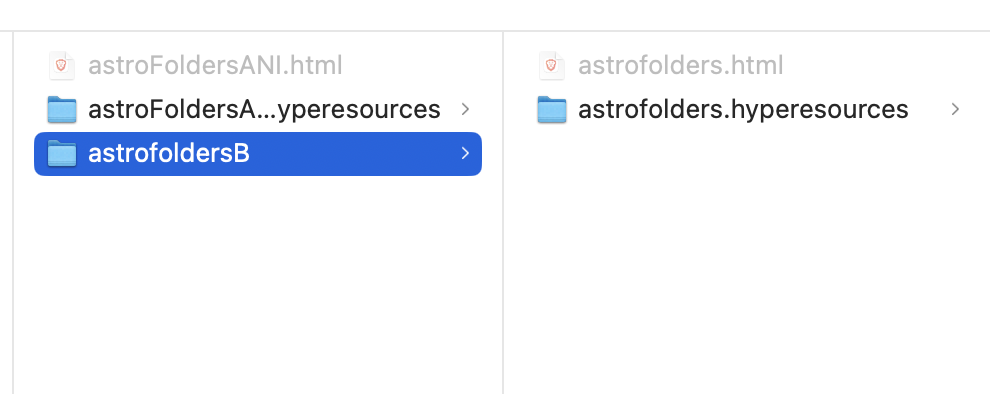
"Desktop and Document Folders" is not turned on. But I do have various apps like calendar set to sync in apps that use Icloud.
Okay! I see what I did there NOW! I was trying to open the html file. Sorry about that! my excuse loooooog hours of looking at the screen as I re design my website. I cannot find the original hype file as it may be lost in the ether. Thank you, thank you for your quick reply! Glenn
No problem! Yeah, you would need to open .hype documents and not the exported .html files.
However if you cannot find the .hype files, then note that there is the Help > Restore Document from Export… feature. You can point this at the .hyperesources folder next to those .html files. However it isn't a "complete" solution, as not all the document data exists in the export. This includes things like display names of elements, original images, and a few other bits. So it is a last resort compared to finding the .hype documents.
Thanks for that tip, as it restored perfectly! Separate question the Wordpress plug in will only work with the Pro version of Hype?
Great, glad that got you going again.
The Hype Animations wordpress plugin only accepts OAM files. OAM export is a feature of the Professional Edition. Therefore the answer is basically 'yes'.
However you don't necessarily need to use the Hype Animations plugin or OAM export. You could manually upload an export to your wp-content folder, and then reference it via div or iframe. You're just on your own for that code/management  .
.