Hi Ed!
Here is a demo that follows along with your request - based on Jonathan’s example:
FlexibleCountdownTimer_JHSv1.hype.zip (24.2 KB)
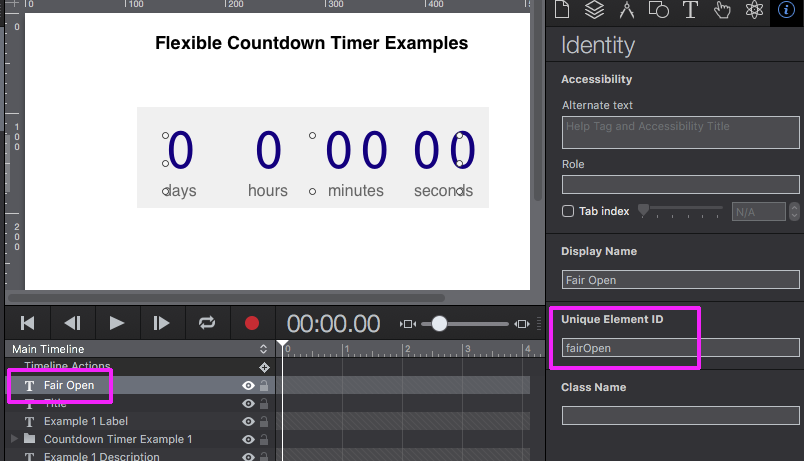
The “Counter Timer Example 1” and “Fair Open” element names in the “Timeline” layers are given an unique ID in the “Identity Inspector”:
Fig.1 - “Fair Open” text field and matching “Unique Element ID” field
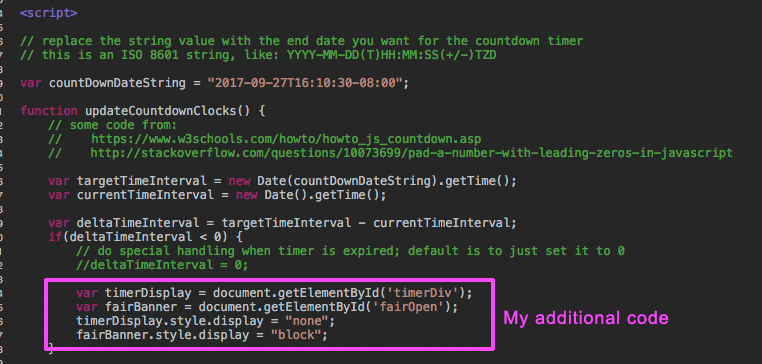
In the code below (found in the “Head HTML” tab of Hype’s interface) the element IDs mentioned above are assigned to a variable (var) :
var timerDisplay = document.getElementById('timerDiv'); var fairBanner = document.getElementById('fairOpen');
When the timer hits zero the element group named “Counter Timer Example 1” (timerDisplay) is hidden (display = “none”); and the hidden text element “Fair Open” (fairBanner) is made visible (display = “block”).
timerDisplay.style.display = "none";
fairBanner.style.display = "block";
Fig. 2 - Code in the “Head HTML” section