A similar issue has shown up before regarding the "Physics" engine... not identical but You might find some helpful overlap with your problem:
@Djon [quote="Djon, post:2, topic:7891, full:true"] I guess you want to move the ball with the paddle? change the physics of the paddles to: Static - interacts without movement [/quote]
@jon4896 tried that actually, screen shot from current set-up:
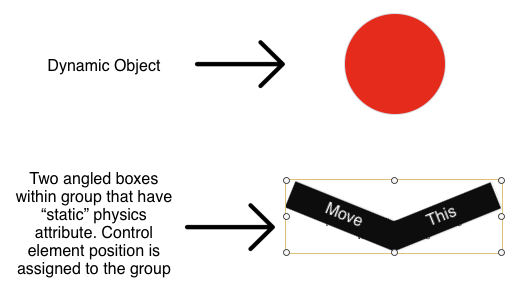
The paddles individually have "Static - interacts without movement" applied and are in a group with no physics assigned. If You assign "Static - interacts without movement" to the group it only interacts with the group's bounding box not the paddles. I tried moving the paddles up out of the group's bounding box - didn't work. Tried a similar approach replacing the group with a symbol, and then making the paddles symbols also (and moving up them out of the "enclosing" symbol's bounding box) - didn't work either.
I don't know if a single SVG "paddle" shape would work - i.e. getting the outline of the SVG graphic to interact instead of the SVG's bounding box. I don't work that much with SVGs, so this is "grasping at straws" ;->
However the ball does respond to an ungrouped single paddle dragged around, so...
Another consideration, that I have not had time to try, is to stick one paddle to the other using JavaScript. This procedure would have a leader and follower, which would vary depending on which paddle You started dragging first.
General concept: The "top, left" position of one of the rectangles is matched to the other's... and obviously there would be an offset as the "top, left" of one rect is in a different "x,y" position. But that differential would stay constant during the drag.