Would be nice if there was an option to reconnect files to import location much like in Premiere. And if that feature would be intelligent like in Premiere it would recognize all files relative to the new location if they also lost connection.
Meaning a structure like
Volume A
|-- Subfolder A
|        File1.jpg
|        File2.jpg
|
|-- Subfolder B
         File3.jpg
would be moved to Volume B breaking all connection. Now we can reconnect a file (a new option in the resource panel). Let us say we reconnect File3.jpg Hype then checks all other unconnected resources and if the exist in the same relative structure in the new location. Meaning if File1.jpg is not connected (that should be the case we move to Volume B) is present under ../Subfolder A/File1.jpg (relative path from the use reconnected File1.jpg). If that is the case it reconnects that to and so on… This would be a pretty solid solution for having custom Folder structures and update-ability with external editors that just overwrite files in the external original files triggering Hype to “sense” a change and offer to reimport. We would need a little and subtle indicator on each file if it currently is linked to an original source outside. Subtle because it’s a nice feature for Pro’s but not mandatory to keep that link fresh.
Mock up of such an indicator:
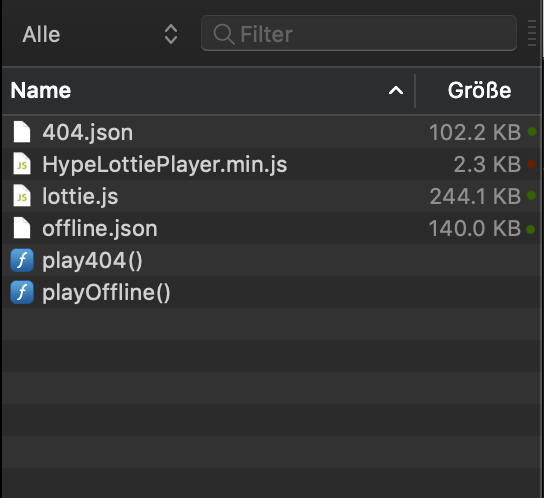
If one doesn’t want a red dot (as it transports urgency) one could stick to a grey dot for connected elements and no dot for unconnected.