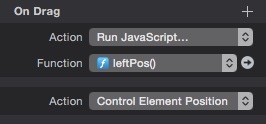
You can put offset to use to build a measuring tool.
var d = hypeDocument.getElementById("box");
var leftPos = d.offsetLeft;
hypeDocument.getElementById('coords').innerHTML = leftPos + " pixels";
In a new Hype doc insert a rectangle with an “id” named “box” and a text box with an “id” named “coords”. Use the Action Inspector to set the “On Drag” functions to “Control Element Position” and attach the javascript there too.